Mandenkan Money: Master the CFA in the West African Market
Building a "Linguistic Calculator": Bridging Base-10 numbering and Base-5 currency in Manden languages.
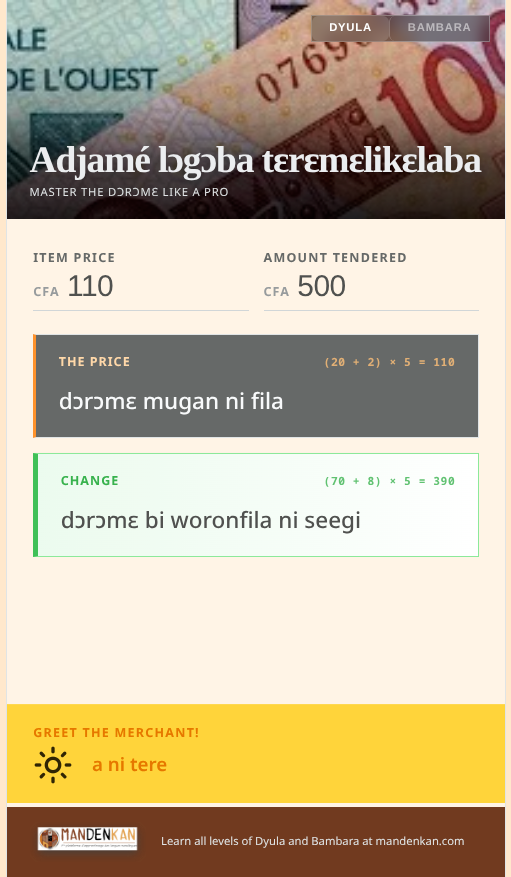
As a developer, I’ve always been fascinated by software that can solve real-world cultural friction. Recently, I tackled a unique challenge: the "Market Math" of West Africa.
In Côte d’Ivoire Mali, and other West African contries, prices are written in CFA Francs (Base-10). However the heart of the market speaks in Dɔrɔmɛ or Dari -—a system built on units of 5 CFA. I built Mandenkan Money to act as a real-time translator between these two worlds for the benefit of local language learners (like myself).
Here’s a look under the hood.
The Tech Stack: Svelte 5 & Runes
Svelte 5 was ideal for this project because of its new Runes system ($state, $derived). Thi is perfect for high-frequency reactive logic.
In a currency app, the state is a moving target. As a user types "110" for example, the app needs to (on each keystroke):
-
Validate that the amount exists or not in physical currency (multiples of 5).
-
Deconstruct any valid number into linguistic parts (110 CFA = 22 units).
-
Compose the Dioula or Bambara string (22 = Mugan ni fila).
Using $derived runes allows to chain these dependencies cleanly. The "Source of Truth" is a single constant: CFA_BASE_UNIT = 5. Everything else -—the math breakdown, the Dioula and Bambara text, and even the UI validation colors—flows automatically from that one base unit.
// The "Source of Truth" for the market
const CFA_BASE_UNIT = 5;

// Reactive state (Svelte 5 Runes)
let priceCfa = $state(null);
let priceInputFocused = $state(false);

// Dependency Chain: Logic flows automatically from the input
const isMultipleOf5 = $derived(priceCfa !== null && priceCfa % CFA_BASE_UNIT === 0);

// Validation colors derived from focus and correctness
const priceWarning = $derived(priceInputFocused && !isMultipleOf5 && priceCfa > 0);
const priceError = $derived(!priceInputFocused && priceCfa > 0 && !isMultipleOf5);

// The final linguistic output gates itself on validation
const priceText = $derived(isMultipleOf5 ? formatOutput(priceCfa) : "");

// Math breakdown: (units) * 5 = CFA
const priceMath = $derived(isMultipleOf5 ? formatMath(priceCfa) : "");
UX for the "apprentice" at the Market"
One of the useful features is the "No-Shame" Math Breakdown.
In Adjamé market, a merchant says "kɛmɛ" (100) and you give them 500 CFA. For a learner, that 5-to-1 jump is a mental hurdle, especially if its an amount like 1250. The app exposes the math right in the UI; super helpful for a language apprentice:
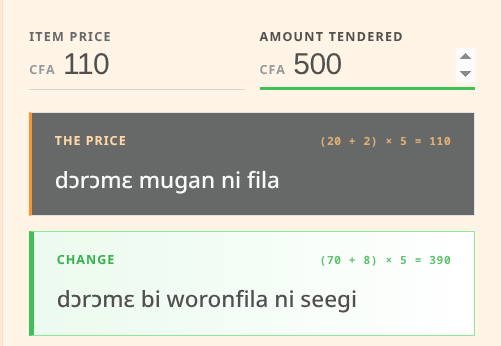
| Price | Math | Linguistics |
|---|---|---|
1250 CFA |
(200 + 50) × 5 = 1250 |
dɔrɔmɛ kɛmɛ fila ni bi looru |
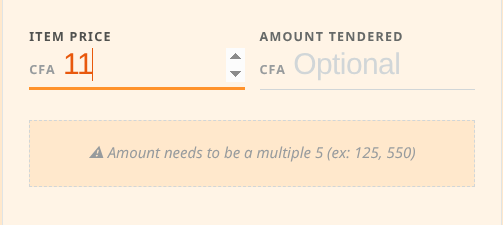
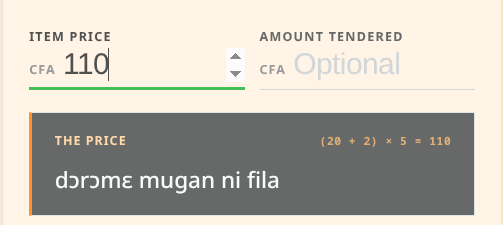
I also implemented a "Traffic Light" validation system. Since you can’t have 11 CFA in the real world, the input line glows orange while you’re mid-keystroke and green the moment you hit a valid multiple of 5. It turns the act of typing into a mini-lesson in market economics.

Beyond the Code: A Mission with Mandenkan.com
This project is more than a utility; it’s a companion to the courses provided at Mandenkan.com. We believe that technology should make African languages more accessible, not replace them.
By digitizing the base-10 counting system and quinary (base-5) currency system of the Manding world, we’re helping a new generation of learners navigate the markets of Abidjan and Bamako with confidence.
NOTE  |
The application allows you to choose your preferred Mandenkan variant: Bambara or Dyula. |
And as a bonus you get a real time greeting calculated according to the time of day!

///
///
///
Try it out!
The app is a PWA (Progressive Web App), meaning it works offline once you’ve installed it --perfect for deep-market browsing where 4G is a luxury.
For Android users: Just click on 'install app', when prompted and it will be functional with no data connection.
For IOS users: Its only a hair more complicated. Apple supports PWA apps, but because they do not use the Apple store are more mysterious to install by design. You need to 'share' the app to your home screen. Just click the 'share' button and choose the Home screen as the destination. The app will then be installed and available for off-line use.
Check out the app here: Mandenkan Money
And while you’re at it, level up your Dyula or Bambara: Mandenkan.com